✨ New Arrivals Just Dropped!Explore
1 / 2
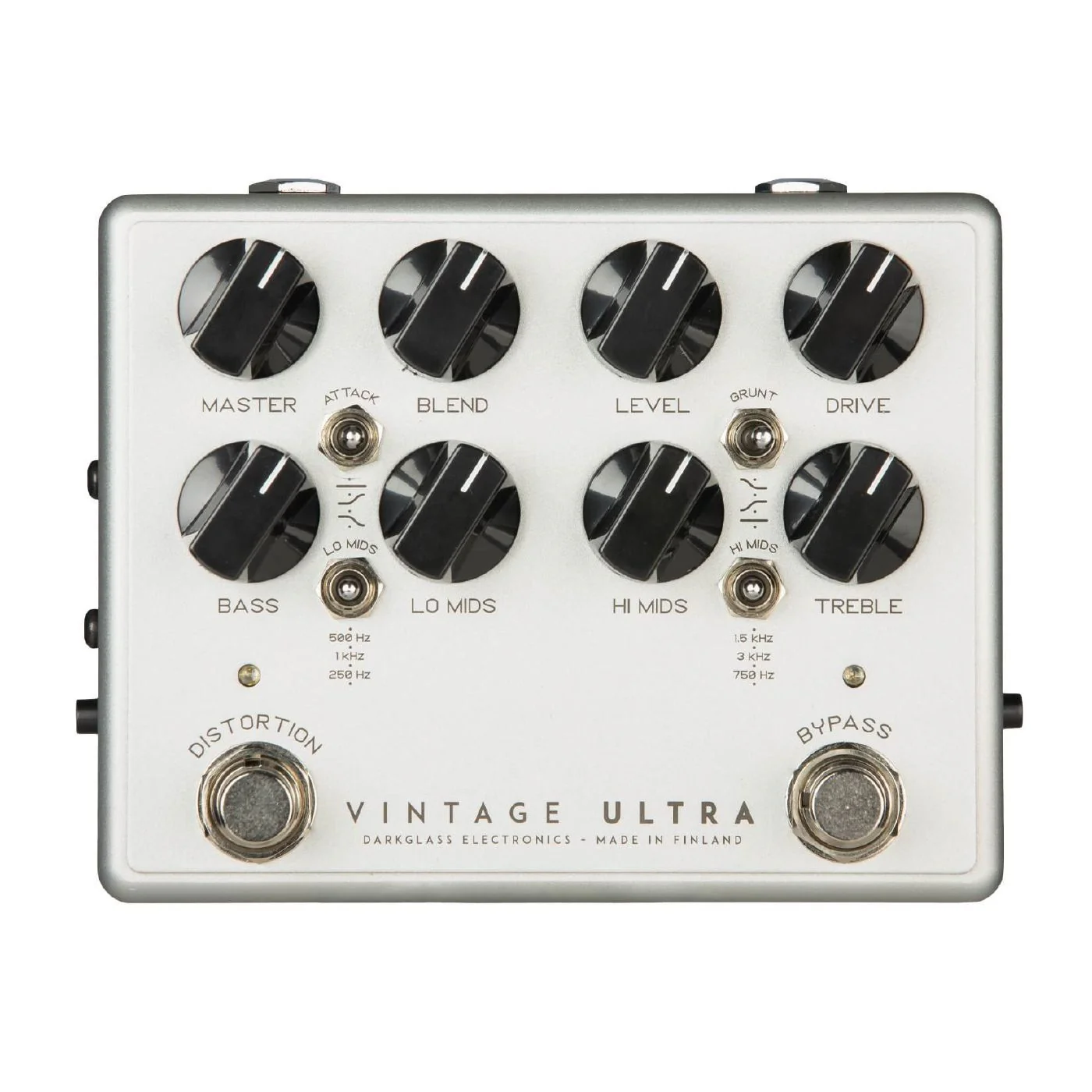
Darkglass Vintage Ultra Bass Overdrive Pedal with Aux Input
Features
- Master: Whereas the Level Knob controls the output of the overdrive section the Master volume adjusts the overall volume of the unit. Ideal for fine tuning the output on clean mode. It also serves as a DI level control.
- Blend: Mixes the clean input signal with the overdriven signal. The clean signal remains at unity gain while the volume of the overdriven signal is set by the Level knob, allowing for fine control of the blend ratio.
- Level: Sets the volume of the overdriven signal.
- Drive: Sets the amount of saturation in the overdriven signal.
- Attack Switch: Sets the amount of treble content to saturate: The "Boost" setting emphasizes the treble content extra clarity and presence. The "Flat" position leaves this register untouched while the "Cut" position will reduce the amount of high frequencies being saturated.
- Grunt Switch: Sets the amount of low frequency content to saturate by selecting between three different bass boost levels before the clipping stage.
- Bass: +-12dB @ 100Hz
- Lo Mids: +-12dB switchable 250Hz, 500Hz and 1kHz
- Hi Mids: +-12dB switchable 750Hz, 1.5KHz and 3kHz
- Treble: +-12dB @ 5kHz
- Direct Output: A balanced version of the ¼” output, useful for running into PA’s or studio mixing consoles.
- Ground lift: Disconnects the signal ground on the Direct Output to break any ground loops. Set this switch to either position that has less noise. The switch does not affect the ¼” output.
- Cab Sim: Toggle the cabinet simulation on/off on the Direct Output. This switch completely bypasses all digital circuits and allows you to get a zero latency signal when needed.
- Headphones: Vintage Ultra has an internal stereo headphone amplifier capable of driving a minimum load of 16 ohms from the 3.5mm stereo jack. Use the Master volume control to adjust the level.
- USB: A Micro USB B connector allows you to connect the pedal to PC/Mac to load cabinet simulation impulse responses to the pedal and control various other settings.
- Aux In: This 3.5mm stereo input allows you to practice with backing tracks from e.g. your smartphone or laptop. Auxiliary input can only be used with the headphone output. The pedal does not control the level, it must be set from your audio source. Remember to always first set the level low before connecting anything to the aux in!
- DIMENSIONS: 10.7x12 cm (4.21x4.72 in)
WATCH: Vintage Ultra v2: Demo by Marcos Sánchez
$226.13
Original: $646.10
-65%Darkglass Vintage Ultra Bass Overdrive Pedal with Aux Input—
$646.10
$226.13Product Information
Product Information
Shipping & Returns
Shipping & Returns
Description
Features
- Master: Whereas the Level Knob controls the output of the overdrive section the Master volume adjusts the overall volume of the unit. Ideal for fine tuning the output on clean mode. It also serves as a DI level control.
- Blend: Mixes the clean input signal with the overdriven signal. The clean signal remains at unity gain while the volume of the overdriven signal is set by the Level knob, allowing for fine control of the blend ratio.
- Level: Sets the volume of the overdriven signal.
- Drive: Sets the amount of saturation in the overdriven signal.
- Attack Switch: Sets the amount of treble content to saturate: The "Boost" setting emphasizes the treble content extra clarity and presence. The "Flat" position leaves this register untouched while the "Cut" position will reduce the amount of high frequencies being saturated.
- Grunt Switch: Sets the amount of low frequency content to saturate by selecting between three different bass boost levels before the clipping stage.
- Bass: +-12dB @ 100Hz
- Lo Mids: +-12dB switchable 250Hz, 500Hz and 1kHz
- Hi Mids: +-12dB switchable 750Hz, 1.5KHz and 3kHz
- Treble: +-12dB @ 5kHz
- Direct Output: A balanced version of the ¼” output, useful for running into PA’s or studio mixing consoles.
- Ground lift: Disconnects the signal ground on the Direct Output to break any ground loops. Set this switch to either position that has less noise. The switch does not affect the ¼” output.
- Cab Sim: Toggle the cabinet simulation on/off on the Direct Output. This switch completely bypasses all digital circuits and allows you to get a zero latency signal when needed.
- Headphones: Vintage Ultra has an internal stereo headphone amplifier capable of driving a minimum load of 16 ohms from the 3.5mm stereo jack. Use the Master volume control to adjust the level.
- USB: A Micro USB B connector allows you to connect the pedal to PC/Mac to load cabinet simulation impulse responses to the pedal and control various other settings.
- Aux In: This 3.5mm stereo input allows you to practice with backing tracks from e.g. your smartphone or laptop. Auxiliary input can only be used with the headphone output. The pedal does not control the level, it must be set from your audio source. Remember to always first set the level low before connecting anything to the aux in!
- DIMENSIONS: 10.7x12 cm (4.21x4.72 in)
WATCH: Vintage Ultra v2: Demo by Marcos Sánchez