PreSonus FaderPort 16 16-Channel Mix Production Controller with DAW Control Motorized Faders
PreSonus FaderPort 16 16-Channel Mix Production Controller with DAW Control Motorized Faders
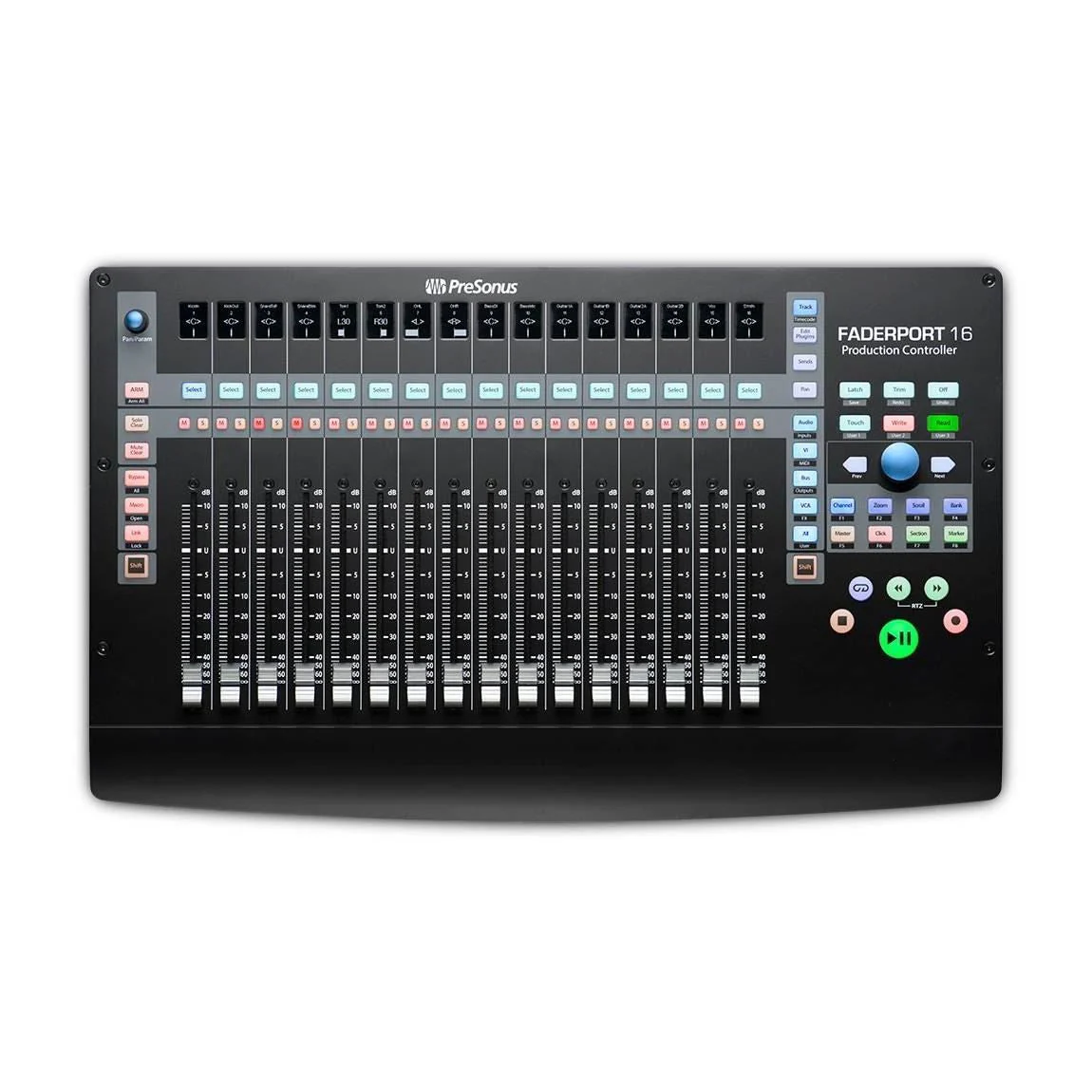
A superior solution for anyone who mixes in the box, only the FaderPort 16 provides 16 100 mm touch-sensitive, motorized faders and 89 buttons covering 104 different functions, all in a compact chassis that easily sits on any desk.
Quickly zoom in on audio files for editing, modify plug-in parameters, manage aux mixes—and, of course, control track levels with the touch of a finger. With the FaderPort 16, you’ll enjoy the fastest, most efficient workflow you’ve ever experienced.
Features
- 6 touch-sensitive, 100 mm long-throw, motorized faders
- 16 Scribble Strip displays
- Complete recording-transport controls: Play, Stop, Fast Forward, Rewind, Record, Loop
- Drop Marker, Next/Prev Marker, Next / Prev Event
- General session controls: Undo/Redo, Arm All, Solo/Mute Clear, Track Management, Click On/Off
- Session Navigator provides quick control over Track Scrolling, Channel Banking, Timeline Scrolling, and much more
- Channel Controls: Level, Pan, Solo, Mute, Rec Arm
- Automation Controls: Touch, Latch, Trim, Write, Read, Off
- Optional Fader functionality: Plug-in edit, bus sends, pan
- Mac / Windows compatible with native Studio One support and HUI and Mackie Control Universal emulation
- Footswitch input for hands-free start/stop
- USB 2.0 connectivity
Specifications
Tech Specs
- Input / Output
- 1 USB 2.0 port
- 1 Footswitch jack for hands-free stop/start
- Faders
- 16 100 mm long-throw, touch-sensitive, motorized faders
- Dual-servo motorized drive belt system for fast and quiet operation
- Ultra-smooth feel and lightning fast
- Heavy-duty construction
- Resolution: 10-bit, 1,024 steps
- Buttons and Knobs
- General Controls: Undo/Redo, Arm All, Solo/Mute Clear, Timecode, Track Management, Click On/Off,
- 4 programmable User buttons, 8 Function buttons, Macro, Parameter Link, Bypass Plug-ins
- Channel Controls: Level, Pan, Solo, Mute, Select, Rec Arm
- Automation Controls: Touch, Latch, Trim, Write, Read, Off
- Optional Fader Functionality: Plug-in Edit, Bus Sends, Pan
- Window View: Mix, Project, Transport, Undo
- Transport: Play, Stop, Fast Forward, Rewind, Record, Loop, Return to Zero (Functionality varies slightly, depending on the DAW.)
- Navigation: Track Scroll, Channel Banking, Timeline Scroll, Horizontal Zoom, Vertical Zoom, Drop
- Marker, Next/Prev Marker, Next/Prev Event, Scrub, Nudge
- Console Management: Show/Hide: Audio Tracks, Inputs, MIDI Tracks, Buses, Outputs, VCAs, FX; Show All
- Displays: 16 digital scribble strip displays, time code display, channel meters
- Power: 12 VDC, 2A external power supply (factory configured, included)
- Physical Dimensions:
- Height: 2.11” (53.59 mm)
- Depth: 11.9” (302.26 mm)
- Width: 19.6” (497.84 mm)
- Weight: 8 lb. (3.63 kg)
Computer system requirements:
Below are the minimum computer-system requirements for the FaderPort™ 16:
Mac
- macOS® 10.11 or higher (64-bit only)
- Intel® Core™ 2 Duo processor (Intel Core i3 or faster recommended)
- 4 GB RAM (8 GB or more recommended)
Windows
- Windows® 7 x64 SP1 + platform update, Windows 8.1 x64, Windows 10 x64
- Intel Core 2 Duo (Intel Core i3 or faster recommended)
- 4 GB RAM (8 GB or more recommended)
Mac and Windows Systems
- USB 2.0 port
- Internet connection required for driver and bundled software installation
- 30 GB hard disk space*
- Monitor with 1366 x 768 resolution (high-dpi monitor recommended)*
* Required for Studio One Note: The minimum system requirements may differ for DAWs Strongthan Studio One. Please check the requirements for your DAW of choice with its manufacturer.
PreSonus FaderPort 16 has been tested and approved to work with the following software:
- Native Mode
- PreSonus® Studio One® 3.5.3
- HUI Emulation
- Supported by Pro Tools 12
- Mackie Control Emulation*
- Supported by Logic, Cubase, Nuendo, Sonar, and Ableton
*Users of third-party DAWs not listed that support the Mackie Control protocol, such as Reason, Bitwig Studio, and Reaper, should contact their DAW vendor for support.
WATCH: PreSonus—FaderPort 16
Product Information
Product Information
Shipping & Returns
Shipping & Returns
Description
A superior solution for anyone who mixes in the box, only the FaderPort 16 provides 16 100 mm touch-sensitive, motorized faders and 89 buttons covering 104 different functions, all in a compact chassis that easily sits on any desk.
Quickly zoom in on audio files for editing, modify plug-in parameters, manage aux mixes—and, of course, control track levels with the touch of a finger. With the FaderPort 16, you’ll enjoy the fastest, most efficient workflow you’ve ever experienced.
Features
- 6 touch-sensitive, 100 mm long-throw, motorized faders
- 16 Scribble Strip displays
- Complete recording-transport controls: Play, Stop, Fast Forward, Rewind, Record, Loop
- Drop Marker, Next/Prev Marker, Next / Prev Event
- General session controls: Undo/Redo, Arm All, Solo/Mute Clear, Track Management, Click On/Off
- Session Navigator provides quick control over Track Scrolling, Channel Banking, Timeline Scrolling, and much more
- Channel Controls: Level, Pan, Solo, Mute, Rec Arm
- Automation Controls: Touch, Latch, Trim, Write, Read, Off
- Optional Fader functionality: Plug-in edit, bus sends, pan
- Mac / Windows compatible with native Studio One support and HUI and Mackie Control Universal emulation
- Footswitch input for hands-free start/stop
- USB 2.0 connectivity
Specifications
Tech Specs
- Input / Output
- 1 USB 2.0 port
- 1 Footswitch jack for hands-free stop/start
- Faders
- 16 100 mm long-throw, touch-sensitive, motorized faders
- Dual-servo motorized drive belt system for fast and quiet operation
- Ultra-smooth feel and lightning fast
- Heavy-duty construction
- Resolution: 10-bit, 1,024 steps
- Buttons and Knobs
- General Controls: Undo/Redo, Arm All, Solo/Mute Clear, Timecode, Track Management, Click On/Off,
- 4 programmable User buttons, 8 Function buttons, Macro, Parameter Link, Bypass Plug-ins
- Channel Controls: Level, Pan, Solo, Mute, Select, Rec Arm
- Automation Controls: Touch, Latch, Trim, Write, Read, Off
- Optional Fader Functionality: Plug-in Edit, Bus Sends, Pan
- Window View: Mix, Project, Transport, Undo
- Transport: Play, Stop, Fast Forward, Rewind, Record, Loop, Return to Zero (Functionality varies slightly, depending on the DAW.)
- Navigation: Track Scroll, Channel Banking, Timeline Scroll, Horizontal Zoom, Vertical Zoom, Drop
- Marker, Next/Prev Marker, Next/Prev Event, Scrub, Nudge
- Console Management: Show/Hide: Audio Tracks, Inputs, MIDI Tracks, Buses, Outputs, VCAs, FX; Show All
- Displays: 16 digital scribble strip displays, time code display, channel meters
- Power: 12 VDC, 2A external power supply (factory configured, included)
- Physical Dimensions:
- Height: 2.11” (53.59 mm)
- Depth: 11.9” (302.26 mm)
- Width: 19.6” (497.84 mm)
- Weight: 8 lb. (3.63 kg)
Computer system requirements:
Below are the minimum computer-system requirements for the FaderPort™ 16:
Mac
- macOS® 10.11 or higher (64-bit only)
- Intel® Core™ 2 Duo processor (Intel Core i3 or faster recommended)
- 4 GB RAM (8 GB or more recommended)
Windows
- Windows® 7 x64 SP1 + platform update, Windows 8.1 x64, Windows 10 x64
- Intel Core 2 Duo (Intel Core i3 or faster recommended)
- 4 GB RAM (8 GB or more recommended)
Mac and Windows Systems
- USB 2.0 port
- Internet connection required for driver and bundled software installation
- 30 GB hard disk space*
- Monitor with 1366 x 768 resolution (high-dpi monitor recommended)*
* Required for Studio One Note: The minimum system requirements may differ for DAWs Strongthan Studio One. Please check the requirements for your DAW of choice with its manufacturer.
PreSonus FaderPort 16 has been tested and approved to work with the following software:
- Native Mode
- PreSonus® Studio One® 3.5.3
- HUI Emulation
- Supported by Pro Tools 12
- Mackie Control Emulation*
- Supported by Logic, Cubase, Nuendo, Sonar, and Ableton
*Users of third-party DAWs not listed that support the Mackie Control protocol, such as Reason, Bitwig Studio, and Reaper, should contact their DAW vendor for support.
WATCH: PreSonus—FaderPort 16